Checking a Cookie Banner Migration With Two PXTA Audits, One Before the Switch and One After
Agencies move clients between consent platforms all the time: OneTrust to Cookiebot, a home-made banner to Didomi, one Usercentrics version to the next. The new banner gets tested by clicking it. The tags behind it usually don’t, because nobody has a list of what the old setup was doing in the first place.
Two PXTA audits make that list and check it.
Before the Switch
Run a full audit of the live site with the old banner:
pxta audit https://client.example --pages 50 --out before
The tracker table in before/report.html is the inventory: every tracker that sent data, on which pages, in which pass. On a site that has had several marketing teams, this is often the first complete list anyone has seen. The consent behaviour table shows how each tag treats the old banner. Fix anything already marked “fires before an answer” or “ignores reject” during the migration, not after.
After the Switch
Run the same audit against the staging site with the new banner:
pxta audit https://staging.client.example --pages 50 --out after
PXTA knows OneTrust, Cookiebot, Didomi and Usercentrics by their own code, and finds other banners by the words on their buttons, so the report says which platform it found and how it answered each pass. If it can’t reject or accept, the report says so instead of guessing.
Compare the Two
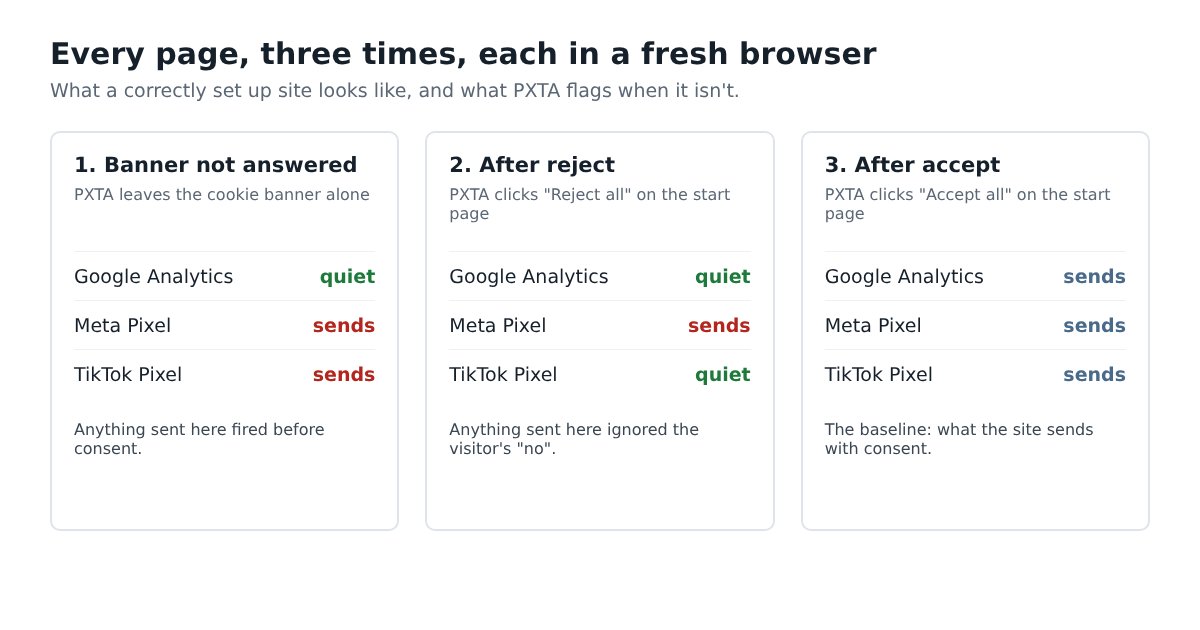
Put the two tracker tables side by side. Every tracker in “before” should be in “after”, or be gone on purpose. Every row in the new consent behaviour table should read quiet, quiet, sends. A tracker that moved from “respects the choice” to “fires before an answer” means the new banner’s events aren’t wired to the tag manager the way the old ones were, which is the most common migration bug.
findings.json holds both audits’ findings with stable codes, so a short script can list what’s new and what’s gone. PXTA 0.1 has no built-in diff yet.