How Site Search Terms Leak to Ad Trackers Through the Page Address
A site’s own search box is where visitors type what they actually want. On a pharmacy it’s a medicine. On a lender it’s “bankruptcy”. On a clinic it’s a symptom. Nobody types those into a page title, but they type them into search.
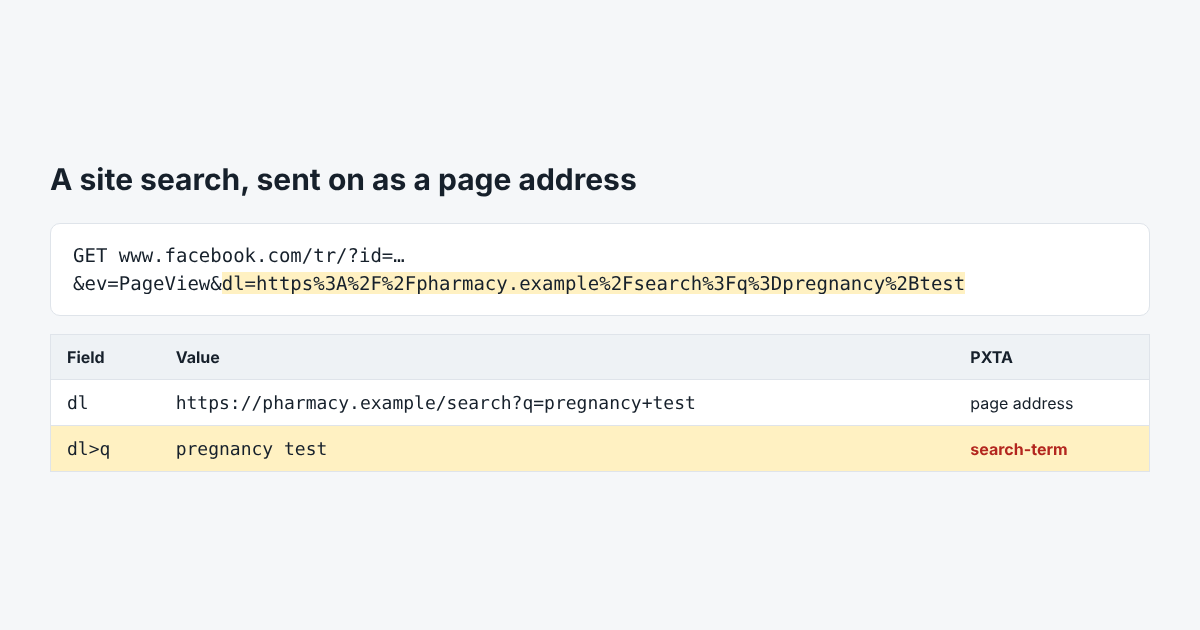
Most sites put the search in the page address: /search?q=pregnancy+test. And nearly every tracker sends the page address with every event. Put the two together and the search goes to every ad network on the page.
Nobody Decides to Send It
This is the leak no one chooses. The marketing team installs a pixel, the pixel reads location.href, and the search page’s address happens to hold the search. There’s no setting in any tag called “send search terms”. It just goes.
The tag doesn’t even need to understand it. The ad network can read the address on its side.
How PXTA Finds Search Terms
When PXTA visits a page whose address has a search parameter, such as q, s, query, search, keyword or term, it notes the term. Then it looks for that term in every tracker request from the page, after decoding: inside the page address field, inside JSON, URL-encoded twice, with + or with spaces. A match becomes a search-term finding:
On /search?q=bankruptcy, the Microsoft Advertising UET tag sent the search term “bankruptcy” after the visitor rejected tracking.
That one is from the Marlow Home Loans sample, where three trackers sent the search after a reject.
Fixes That Work
- Keep the search out of what tags see. Tag managers can strip query strings from the page address before it goes to a tag. Google Analytics has a site search setting that reads the term on Google’s side, which is a separate question from whether it should get it at all.
- POST the search instead. A search that submits as a form post doesn’t change the address.
- Wait for consent. If the tag only loads after accept, at least the visitors who said no aren’t included.
Run PXTA on a search page directly to check: pxta audit 'https://www.example.com/search?q=test' --pages 1.