What Google Analytics 4 Sends From a Website, and Where Personal Data Slips In
Google Analytics 4 sends its data to an address ending in /g/collect, on google-analytics.com, analytics.google.com or a regional variant of them. One request can hold several events, one per line of the request body, with page details in the query string.
Google’s own rules say not to send personally identifiable information to Analytics. That’s a rule for the site owner, though, and the tag sends whatever the page gives it. PXTA checks what actually goes out.
The Fields That Matter
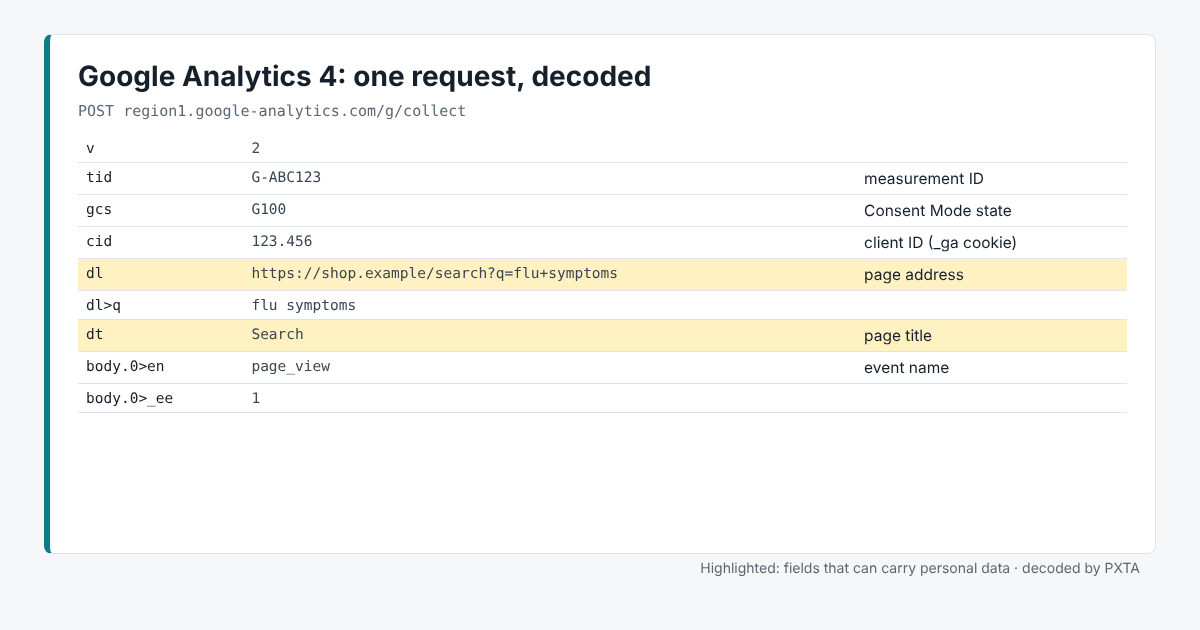
tidis the measurement ID, theG-code of the property.enis the event name, such aspage_view,purchaseorsign_up. In a request with several events, PXTA lists each one’s fields underbody.0>,body.1>and so on.dlis the page address anddtthe page title.dris the referring page.cidis the client ID from the_gacookie, andsidthe session.uidis a user ID the site sets itself, usually its own customer number.ep.andup.fields carry event parameters and user properties the site adds.gcsis the Google Consent Mode state, such asG100orG111.
Where It Usually Goes Wrong
Search terms and emails in the address. A search page like /search?q=flu+symptoms sends the search to Google in dl. PXTA decodes the address and flags the term, as in the image above. The same goes for emails in confirmation links.
Custom parameters. Developers add ep. fields for reporting, and sometimes an email or a name ends up in one. PXTA runs its rules on every field, so these show up even with names it has never seen.
Consent Mode that says one thing while the request does another. With Consent Mode, the tag can keep sending requests after a visitor says no, marked G100 for denied. PXTA reports consent-mode-mismatch when a denied request still carries personal data, and consent-mode-granted when the state says granted before an answer or after a reject. The Consent Mode explainer has the details.
What PXTA Can’t See
GA4 also accepts events from a site’s server through the Measurement Protocol, and many sites run a server-side Tag Manager container that forwards data to Google. Neither passes through the browser in a form PXTA can attribute to Google.
The Cedar Valley Clinic report is a case where GA4 is set up properly and waits for consent, while other tags on the same site don’t.