What the LinkedIn Insight Tag Sends, and Why Its Page Addresses Matter Most
The LinkedIn Insight Tag is a B2B favourite. It lets a company see which job titles and industries visit its site, retarget them on LinkedIn, and count conversions from LinkedIn ads. Requests go to px.ads.linkedin.com, mostly to /collect and /wa/.
Compared with the Meta and TikTok pixels it sends little. A partner ID, the page address, a timestamp. That’s exactly why the page address deserves attention: it’s nearly everything the tag says about the visit.
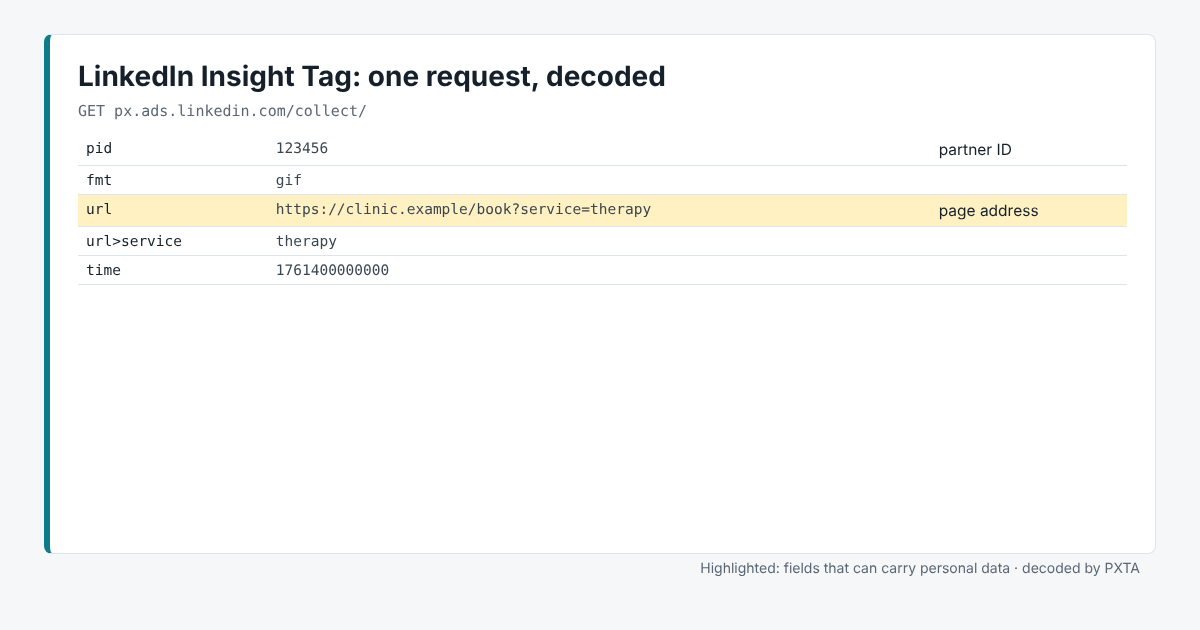
The Fields That Matter
pid, orpidswhen a site has several, is the partner ID that says whose account gets the data.urlorpageUrlis the page address. PXTA decodes the address too, so its own parameters show up as rows likeurl>service.referreris the previous page.conversionIdmarks a conversion event.
Where It Usually Goes Wrong
Addresses that describe the visitor. LinkedIn links the visit to a member profile through its own cookies. A request that sends /book?service=therapy tells LinkedIn which member looked at booking therapy. PXTA treats addresses about health, money trouble, checkout and accounts as sensitive pages, and reports them by name.
Installed for recruiting, left everywhere. The tag often goes in for a hiring campaign or a single landing page, and the snippet ends up in the site-wide template. PXTA’s tracker table lists every page where it sent data.
Consent. Like the other pasted-in tags, the Insight Tag runs before the banner unless it’s loaded through the banner or a tag manager that checks consent.
What PXTA Can’t See
LinkedIn also offers a Conversions API for server-side events, and conversion tracking that uses data the site sends from its own systems. Neither shows up in the browser.
The Cedar Valley Clinic sample report shows the Insight Tag sending condition pages and a health search after the visitor rejected tracking.