What the X Pixel, Formerly the Twitter Pixel, Sends From Page Addresses to Search Terms
X’s website tag, still loaded from static.ads-twitter.com as uwt.js, sends its events to analytics.twitter.com/i/adsct and t.co/i/adsct. Many sites have one left over from a Twitter campaign years ago, and it keeps firing on every page.
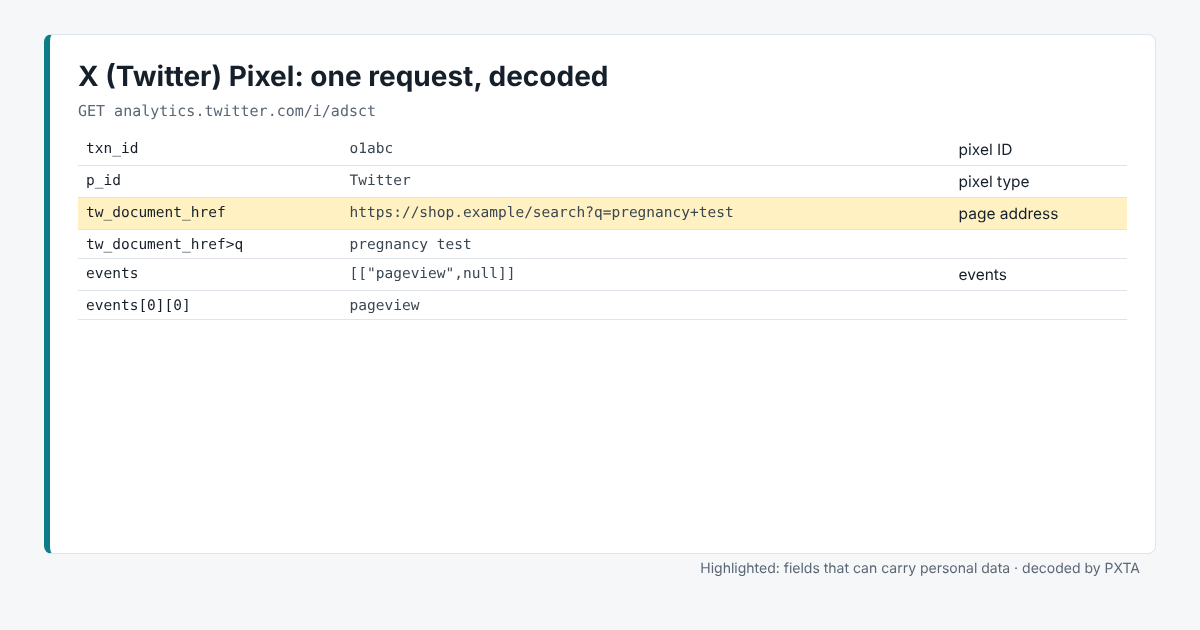
Its request is a plain query string. The interesting field has a long name: tw_document_href, the address of the page.
The Fields That Matter
txn_idis the pixel ID, andp_idthe pixel type.tw_document_hrefis the page address andtw_document_referrerthe previous page.eventslists the events in the request as a small JSON array, such aspageview.
Where It Usually Goes Wrong
Search pages. In the image, the page is /search?q=pregnancy+test. PXTA decodes the address, finds the search term, and reports it as a search-term finding. On a pharmacy, a clinic or a lender, a site search can say more about a person than any page they visit.
Forgotten tags. An X tag added for one campaign often outlives it. If nobody looks at the X ads account any more, the tag sends data nobody uses. The trackers table in a PXTA report is an easy way to spot it.
Consent. In the Marlow Home Loans sample, the X Pixel loaded after the visitor rejected, sending the debt consolidation page and a search for “bankruptcy”.
What PXTA Can’t See
X also accepts conversions sent from a site’s server through its Conversions API. That traffic stays out of the browser.